
Tips for push notifications
Push notifications are one of those features that make an app feel ‘native’. They are also one of the features people are most likely to revoke their permissions for. How can you use push notifications to engage more with users without overwhelming them?
If you do push notifications right they can be one of the most valuable engagement tools. In this post I’ll walk you through some tips and best practices I learned along the way.
Why push notifications often fail
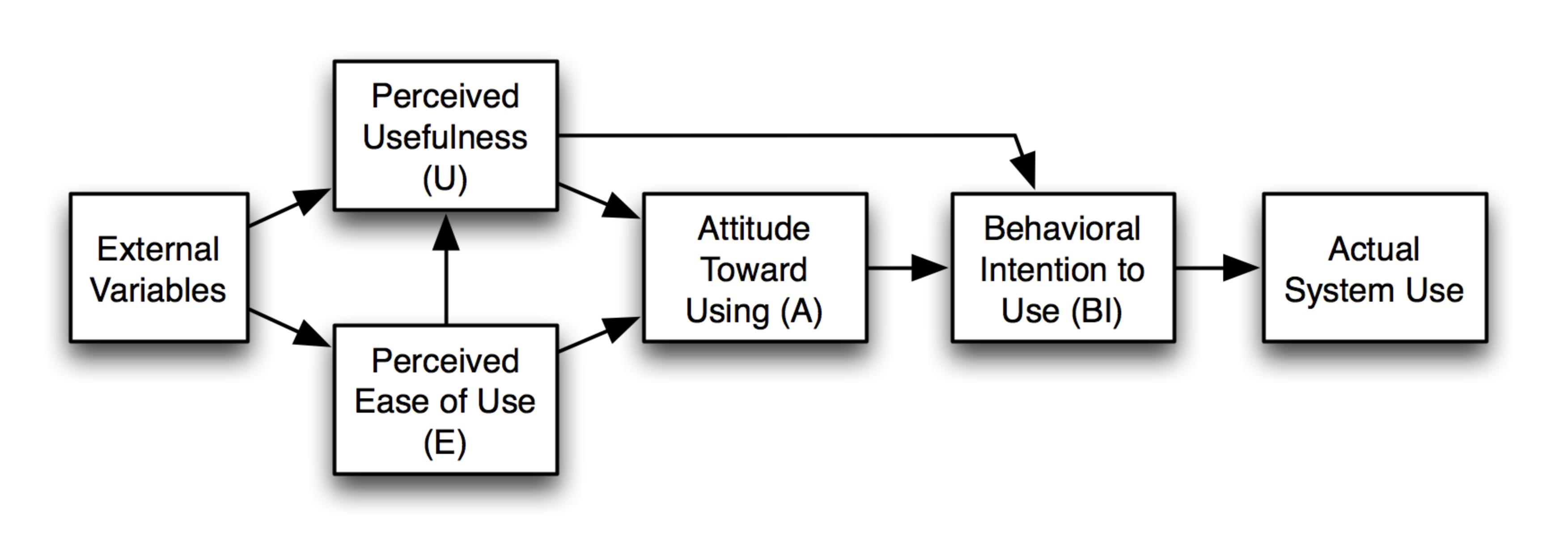
Push notifications can be used in many ways, ranging from breaking news to promotions. Whether people use and interact with the push notifications you are sending is influenced by their attitude towards the implementation of push notifications in your app. If they think getting the notifications is useful they are more inclined to keep them turned on. Similarly, if they perceive it to be easy to use the notifications they are more inclined to turn them on. A sense of control and urge to be informed determines their drive to use push notifications.
Apps with high unsubscribe rates tend to fail to match their user’s attitudes. They send notifications with the wrong information or at the wrong time. This leads to the user feeling the app sends too many or annoying notifications, thus turning them off (or even worse - delete the app!)
Factors to success
Successful push notifications, whether they are send once or many times a day, tend to have a few commonalities:
- Time sensitiveness, the information is relevant now more so than in the future, for example because otherwise you'll miss a deadline.
- Locality, the notification informs you about something happening near you.
- Personal, a generic broad notification would more likely be seen as a disturbance than a focused one.
- Diversity, sending the same over and over is more likely to cause annoyance.
- Customization, allowing the user for example to change which notifications they get.
You may even ‘calculate’ a score for your notification using these factors, the more you can tick off, the more the user will appreciate it with an attitude of ‘forgiveness’ towards being disturbed.
Choosing your push notification stack
As you can see, personalisation is more or less the underlying approach to take when working towards good notifications. In my personal projects as well as at work projects I have used two tools to work with push notifications in apps (all made using React Native and Expo). The Expo push notifications are great to quickly have them integrated into your app and start receiving push notifications. For sending and personalising the notifications you still need to find, or create, a backend. That is why for a few apps I used OneSignal instead. OneSignal is one of the many alternatives that offer things like segmentation, journeys and scheduled notifications once you get past the slight learning and setup curve.
Expo Push Notifications
- + Free
- + Lightweight and fast setup
- + Push Tool to test notifications
- - No personalisation features
OneSignal
- + Free tier
- + Many advanced features
- + Dashboard to create, send and monitor notifications
- - Takes longer to setup and configure
From the perspective of the developer both services work the same: the app, whether on iOS or Android, registers the user with the service and when sending a notification the service determines whether it should go through the servers of Apple or Google, no headaches for the developer there!
My biggest lessons learned
Having implemented push notifications in several apps now I have learned that even the most simplistic personalisation and control options can help to improve the engagement with my users.
Try to find some way to divide your users into groups which you can target with specific messages. I found that it is best to not send too many (>5) notifications per day, although there are statistics that for some apps even 20+ is accepted by users - illustrating that whether a notification is intrusive is highly dependent on the perceived usefulness and ease of use.
Follow the factors to success and give your users control over which notifications they receive and you are the most likely to not overwhelm your users. Happy notifying!